


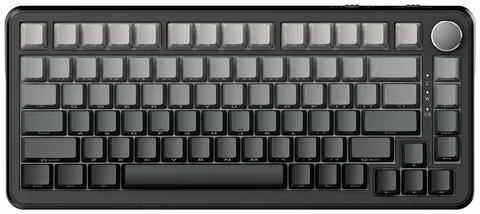
When building or customizing a mechanical keyboard, one of the most crucial decisions you’ll make is selecting the right switches. Whether you’re a gaming enthusiast, a typist, or someone who spends a lot of time on their computer, choosing the right switches for your 75 keyboard can significantly impact your overall experience. With so many different types of switches available, understanding their characteristics is key to making an informed decision. In this guide, we’ll walk you through everything you need to know about picking the perfect switches for your 75% keyboard.
What Is a 75% Keyboard?
Before diving into switches, it’s important to understand what a 75% keyboard is. A 75% layout is a compact version of a full-size keyboard, offering a balance between size and functionality. It retains most of the essential keys like the arrow keys and function row but reduces the number of keys and space by removing the number pad and some other extraneous keys. This compact layout is perfect for those who want a more portable keyboard without sacrificing too many features.
Types of Mechanical Switches
Mechanical switches are the heart of any mechanical keyboard. They are responsible for registering keystrokes and providing tactile feedback. There are three main types of switches: linear, tactile, and clicky. Understanding these switch types will help you choose the right one for your 75% keyboard.
Linear Switches
Linear switches are smooth and don’t have any tactile bump or audible click when pressed. These switches are ideal for fast typists and gamers who want a seamless, uninterrupted key press. Popular examples of linear switches include Cherry MX Reds and Gateron Reds. They are quiet and offer a smooth keystroke, making them great for environments where you don’t want to disturb others.
Tactile Switches
Tactile switches provide feedback in the form of a noticeable bump as you press down on a key. This feedback lets you know that the key has been activated, making them popular for typists who want to feel each keystroke. Examples of tactile switches include Cherry MX Browns and Cherry MX Clears. They strike a balance between gaming and typing, offering a satisfying experience for both.
Clicky Switches
Clicky switches are the loudest of the three and provide both tactile feedback and an audible “click” when activated. They’re perfect for those who enjoy a satisfying, clicky sound with each keystroke. Popular clicky switches include Cherry MX Blues and Cherry MX Greens. These switches are often favored by typists who love the auditory confirmation of each press, but they might not be ideal for shared workspaces.
Key Considerations When Choosing Switches for a 75% Keyboard
When choosing the right switches for your 75% keyboard, you should consider several factors. These factors include typing style, sound preferences, and the overall feel of the switch.
1. Typing Experience
The most important factor is how the switch feels under your fingers. Some people prefer a smooth and uninterrupted keystroke (linear), while others enjoy the tactile feedback (tactile) or the sound of a click (clicky). If you’re a typist, you may prefer tactile switches for the feedback, while gamers often prefer linear switches for quick and uninterrupted keystrokes.
2. Sound Level
If you work in a shared space or live in close quarters with others, sound level is an important consideration. Linear switches are generally the quietest, while tactile and clicky switches are louder. If you’re gaming at night or typing in a quiet environment, it’s best to go for a quieter switch to avoid disturbing others.
3. Actuation Force
Different switches require different amounts of force to actuate. Some people prefer lighter switches that require less force to press, while others like switches that require a bit more pressure. Linear switches, such as Cherry MX Reds, often have a light actuation force, while tactile and clicky switches like Cherry MX Browns and Blues require a bit more force.
4. Personal Preference
Ultimately, choosing the right switch for your 75% keyboard comes down to personal preference. What feels comfortable to you is the most important factor. Some users prefer the consistency of linear switches, while others enjoy the feedback and sound from tactile or clicky switches.
Popular Switch Brands for 75% Keyboards
There are many switch brands on the market, but some of the most popular include:
- Cherry MX: One of the most well-known brands in the mechanical keyboard world. Their switches are renowned for their durability and consistency.
- Gateron: Gateron switches are often seen as a more affordable alternative to Cherry MX switches and offer a smooth experience, especially with their linear switches.
- Kailh: Kailh switches are another popular brand, known for their affordability and variety of switches, including clicky and tactile options.
- Razer: Razer’s own mechanical switches are often found in their gaming keyboards, and they offer options with customizable actuation points.
How to Test Switches Before Choosing
If you’re unsure about which switches to choose for your 75% keyboard, it’s a good idea to test them out first. Some online stores and keyboard communities offer “switch testers” that allow you to try out different switches before committing. You can also check for local keyboard meetups or try visiting a store that lets you test mechanical keyboards in person.
Conclusion
Choosing the right switches for your 75% keyboard is essential for creating the perfect typing or gaming experience. Whether you prefer the smooth, fast response of linear switches, the tactile feedback of a tactile switch, or the satisfying click of a clicky switch, there’s a switch that suits your style. Consider factors like sound, actuation force, and your personal preferences to make an informed decision. With the right switch, your 75% keyboard will not only look great but feel great to type or game on as well.
